This blog gives you information about the latest gadgets of the e-world.
So start feeding on it !!!!
MICROMAX A116 CANVAS HD

| GENERAL | 2G Network | GSM 900 / 1800 - SIM 1 & SIM 2 |
|---|---|---|
| 3G Network | HSDPA 2100 | |
| SIM | Dual SIM | |
| Announced | 2013, January | |
| Status | Available. Released 2013, February |
| BODY | Dimensions | 144 x 74 x 10.7 mm (5.67 x 2.91 x 0.42 in) |
|---|---|---|
| Weight | 156 g (5.50 oz) |
| DISPLAY | Type | IPS LCD capacitive touchscreen, 16M colors |
|---|---|---|
| Size | 720 x 1280 pixels, 5.0 inches (~294 ppi pixel density) | |
| Multitouch | Yes | |
| Protection | Yes |
| SOUND | Alert types | Vibration, MP3, WAV ringtones |
|---|---|---|
| Loudspeaker | Yes | |
| 3.5mm jack | Yes |
| MEMORY | Card slot | microSD, up to 32 GB |
|---|---|---|
| Internal | 4 GB (1.77 GB user available), 1 GB RAM |
| DATA | GPRS | Yes |
|---|---|---|
| EDGE | Yes | |
| Speed | HSDPA, 21 Mbps; HSUPA, 11 Mbps | |
| WLAN | Wi-Fi 802.11 b/g/n, Wi-Fi hotspot | |
| Bluetooth | Yes, v4.0 with A2DP | |
| USB | Yes, microUSB v2.0, USB On-the-go |
| CAMERA | Primary | 8 MP, 3264 x 2448 pixels, autofocus, LED flash |
|---|---|---|
| Features | Geo-tagging, touch focus, face detection | |
| Video | Yes, 720p@30fps | |
| Secondary | Yes, 2 MP, VGA video rec. |
| FEATURES | OS | Android OS, v4.1.2 (Jelly Bean), planned upgrade to v4.2 (Jelly Bean) |
|---|---|---|
| Chipset | MTK MT6589 | |
| CPU | Quad-core 1.2 GHz Cortex-A7 | |
| GPU | PowerVR SGX544 | |
| Sensors | Accelerometer, gyro, proximity | |
| Messaging | SMS(threaded view), MMS, Email, Push Email, IM | |
| Browser | HTML5 | |
| Radio | FM radio | |
| GPS | Yes, with A-GPS support | |
| Java | Yes, via Java MIDP emulator | |
| Colors | Black, White | |
| - SNS integration - MP3/AAC/WMA/WAV player - MP4/WMV/H.264/H.263 player - Organizer - Document viewer - Google Search, Maps, Gmail, Youtube, Calendar, Google Talk - Voice memo/dial - Predictive text input |
| BATTERY | Li-Ion 2000 mAh battery | |
|---|---|---|
| Stand-by | Up to 174 h | |
| Talk time | Up to 5 h |
| MISC | SAR EU | 0.47 W/kg (head) 0.41 W/kg (body) |
|---|---|---|
| Price group |  |

| GENERAL | 2G Network | GSM 900 / 1800 - SIM 1 & SIM 2 |
|---|---|---|
| 3G Network | HSDPA 2100 | |
| SIM | Dual SIM (Mini-SIM) | |
| Announced | 2013, March | |
| Status | Coming soon. Exp. release 2013, Q2 |
| BODY | Dimensions | - |
|---|---|---|
| Weight | - |
| DISPLAY | Type | IPS LCD capacitive touchscreen, 16M colors |
|---|---|---|
| Size | 540 x 960 pixels, 5.0 inches (~220 ppi pixel density) | |
| Multitouch | Yes |
| SOUND | Alert types | Vibration, MP3, WAV ringtones |
|---|---|---|
| Loudspeaker | Yes | |
| 3.5mm jack | Yes |
| MEMORY | Card slot | microSD, up to 32 GB |
|---|---|---|
| Internal | 4 GB, 1 GB RAM |
| DATA | GPRS | Yes |
|---|---|---|
| EDGE | Yes | |
| Speed | HSDPA | |
| WLAN | Wi-Fi 802.11 b/g/n, Wi-Fi hotspot | |
| Bluetooth | Yes, with A2DP | |
| USB | Yes, microUSB v2.0 |
| CAMERA | Primary | 8 MP, 3264 x 2448 pixels, autofocus, LED flash |
|---|---|---|
| Features | Geo-tagging | |
| Video | Yes | |
| Secondary | Yes, 2 MP |
| FEATURES | OS | Android OS, v4.1 (Jelly Bean) |
|---|---|---|
| CPU | Quad-core 1.2 GHz | |
| Sensors | Accelerometer, proximity, compass | |
| Messaging | SMS(threaded view), MMS, Email, Push Email, IM | |
| Browser | HTML | |
| Radio | FM radio | |
| GPS | Yes, with A-GPS support | |
| Java | Yes, via Java MIDP emulator | |
| Colors | Blue | |
| - SNS integration - MP3/AAC/WMA/WAV player - MP4/WMV/H.264/H.263 player - Organizer - Document viewer - Voice memo/dial - Predictive text input |
| BATTERY | Li-Ion 2000 mAh battery | |
|---|---|---|
| Stand-by | ||
| Talk time |
I BALL SLIDE 6309i TABLET
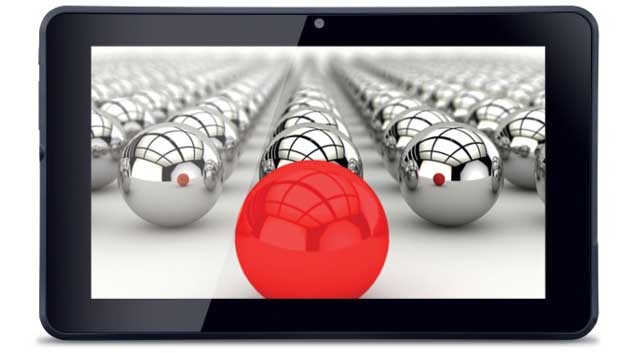
iBall has launched another budget 7-inch tablet in the Indian market. Dubbed iBall Slide 6309i, the tablet comes with a 7-inch screen with a display resolution of 1024X600 pixels.
iBall Slide 6309i packs in 1.2GHz ARM Cortex A9 processor along with 1GB of RAM. The tablet comes with 2GB of internal storage, which can be expanded by up to 32GB through a microSD card. For camera, there is a 2-megapixel rear camera and a 0.3-megapixel one on the front.
Connectivity options include Wi-Fi, Bluetooth, Micro-USB, HDMI port and 3G through dongle. The tablet also packs in 3,000mAh battery.
iBall Slide 6309i runs on Android 4.1 (Jelly Bean) and is available for Rs. 5,199. It is 11mm thick and weighs 310 grams.
iBall Slide 6309i will be competing with the other budget Android 4.1 tablets such as Micromax Funbook Talk P360, HCL ME U2, Videocon VT 75C and the Lava Etab Xtron.
iBall had recently launched iBall Edu-Slide i-1017 tablet targeted at students. This tablet features a 10.1-inch screen that comes with a resolution of 1280X800. It packs in a dual-core Cortex A9 processor that clocks speed of 1.5GHz. The tablet comes with 1GB of RAM and runs on Android 4.1 (Jelly Bean) operating system. There is 8GB of internal storage available on the device, which can be expanded via microSD card.
LAVA ETAB XTRON
As more Indian brands explore the Android tablets segment, consumers are getting access to devices that sport decent specifications, and run the latest version of the OS, at attractive price points. We've recently seen Acer launching a 7-inch budget tablet running Jelly Bean, and now we have Lava launching its first Jelly Bean tablet, the Etab Xtron, in the Indian market, for Rs. 6,499. We take an in-depth look at the tablet.
Build
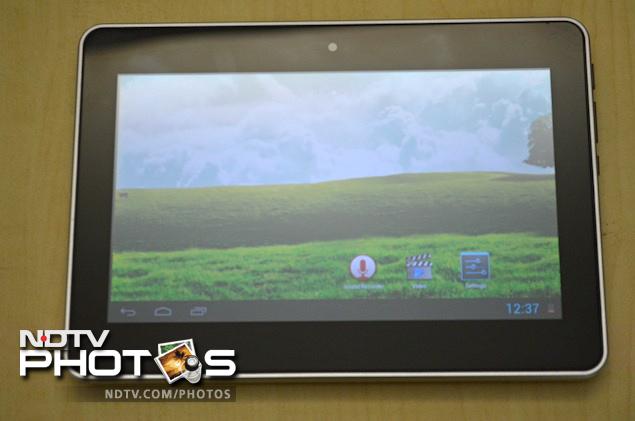
Unlike the Acer Iconia B1, the Etab Xtron exudes a feeling of durability, with its solid build. The 7-inch tablet looks compact yet sturdy. The front of the tablet features a 7-inch screen, which is surrounded by a large bezel. You'll also spot a front shooter right at the middle.
The back of the tablet is made of polycarbonate but has been given a brushed aluminium finish. The frame extends to the front, and adds to the design of the tablet. A microSD card slot and a 3.5mm headphone jack sits on the top, while there are no ports on the bottom.
 The power button, a volume rocker, and a refresh/'return to home screen' button, a micro-USB port and a microphone are located at the right hand side of the tablet. There are labels or markings for these ports and buttons at the back. There's some Lava branding at the bottom left corner of the back and Xtron branding at the middle. The speaker grill is also placed at the top left corner of the back.
Display
The 7-inch TFT display comes with a resolution of 1024x600 pixels, which is decent compared to other 7-inch budget tablets in the segment. Images and videos looked good but text, specially with smaller font size was not very legible. The screen brightness is average, and although we found that it's reflective to some extent, visibility under sunlight was not bad. The display has an IPS panel that facilitates wider viewing angles, which essentially means that more than one person can view content playing on the screen properly, even from different angles. We found that this holds true in the case of the Lava Etab Xtron, and we were able to view media playing on the screen from different angles. The touch sensitivity is good, and we didn't encounter any issues while using the device.
Software/ Interface
The Lava Etab Xtron runs Android 4.1 - Jelly Bean, the latest iteration of the operating system, and doesn't include any custom skin. It's a stock build of the OS bundled with a few third party apps including music streaming app, Saavn, a file browser, an app for Video-on-demand service, BigFlix, education app EduKart, PingPong- a game, a video player and a local deals and search app, UAhoy. We like the fact that there's no bloatware.
The Etab Xtron is one of the few tablets that runs Jelly Bean. Unlike the Nexus 7, the tablet's onscreen controls are on the bottom left instead of the centre, and the notification panel and quick access settings (for Wi-Fi, Screen rotation, brightness, sound and shortcut to settings) are located at the bottom right.
During our use, we didn't notice much lag while navigating through menus, and Google's much touted 'Project Butter' makes the overall experience more responsive than tablets running Ice Cream Sandwich.
The other major feature that Jelly Bean brings is 'Google Now', a voice based information assistant and an extension of Google search. You can ask questions and the tool returns answers or search results. It uses 'cards' which are essentially small boxes that offer different sets of information ranging from weather forecast, directions, traffic information, scores, appointments, and currency conversion, among others. Google Now collects information based on the user's behaviour, location and even email to offer information, automatically.
We're not sure if the tablet will get updated to Jelly Bean 4.2, but if it does, features like multi-user accounts (different profiles and access for different users) and lock-screen widgets would also come to the tablet.
Camera
The tablet comes with a 2-megapixel front-facing camera. Although, personally we're no fans on using tablets for clicking needs, some may miss having a rear camera that can be used for taking casual shots or just for scanning some documents. The pictures that we clicked with the front camera, indoors, were decent. The camera does a decent job when used for making video calls over Skype or other video chat apps.
Performance/ Battery Life
The tablet is powered by a 1.5 GHz Cortex A9 dual-core processor, a Mali-400 GPU and 1 GB of RAM. We also did not notice much lag and were able to play tablet optimised games and HD video clips, without a hitch as the bundled video player supports all major video file formats. The tablet comes with the native Android browser and renders all webpages well. Adobe Flash is pre-installed allowing the browser to display Flash videos, banners and other elements. The speakers on the tablet deliver good quality sound at even high volume levels but the output through the speaker grill was not very loud. There's no voice calling but the major omission is Bluetooth connectivity. We're not sure why Lava had to exclude it since most major Android devices offer this functionality, and consumers might use it for wireless file transfers or for connecting a wireless input device.
The tablet comes with a 3,500 mAh battery and we were not very happy with the backup that it offered, specially when playing multimedia files. We were able to get around 3.5 hours of video playback, with the display on full brightness levels. The standby time with push notifications and emails on was decent, though. With intermediate usage during the day, we were able to get a day of backup.
Verdict
The Lava Etab Xtron is a decent tablet. At a price of Rs. 6,499, it offers a good package with decent hardware, compact form factor, a screen that supports wide angled viewing and the latest version of Android, Jelly Bean. It's a good value for money proposition. It's also interesting to look at if you're looking for an e-reader or for a device for browsing the web.
Looking at competing devices, the Acer Iconia B1-A71 is also an interesting 7-incher, which also offers Bluetooth connectivity, but is inferior in terms of build quality and costs more. If you're looking for a tablet that also offers voice calling, the Huawei Mediapad Lite is another good option available, but you'd need to shell out around Rs. 7,000 extra. The Wickedleak Wammy Desire is another 7-inch tablet running Jelly Bean, available at a price of Rs. 6,800.
Price: Rs. 6,499
Build
Unlike the Acer Iconia B1, the Etab Xtron exudes a feeling of durability, with its solid build. The 7-inch tablet looks compact yet sturdy. The front of the tablet features a 7-inch screen, which is surrounded by a large bezel. You'll also spot a front shooter right at the middle.
The back of the tablet is made of polycarbonate but has been given a brushed aluminium finish. The frame extends to the front, and adds to the design of the tablet. A microSD card slot and a 3.5mm headphone jack sits on the top, while there are no ports on the bottom.
The power button, a volume rocker, and a refresh/'return to home screen' button, a micro-USB port and a microphone are located at the right hand side of the tablet. There are labels or markings for these ports and buttons at the back. There's some Lava branding at the bottom left corner of the back and Xtron branding at the middle. The speaker grill is also placed at the top left corner of the back.Display
The 7-inch TFT display comes with a resolution of 1024x600 pixels, which is decent compared to other 7-inch budget tablets in the segment. Images and videos looked good but text, specially with smaller font size was not very legible. The screen brightness is average, and although we found that it's reflective to some extent, visibility under sunlight was not bad. The display has an IPS panel that facilitates wider viewing angles, which essentially means that more than one person can view content playing on the screen properly, even from different angles. We found that this holds true in the case of the Lava Etab Xtron, and we were able to view media playing on the screen from different angles. The touch sensitivity is good, and we didn't encounter any issues while using the device.
Software/ Interface
The Lava Etab Xtron runs Android 4.1 - Jelly Bean, the latest iteration of the operating system, and doesn't include any custom skin. It's a stock build of the OS bundled with a few third party apps including music streaming app, Saavn, a file browser, an app for Video-on-demand service, BigFlix, education app EduKart, PingPong- a game, a video player and a local deals and search app, UAhoy. We like the fact that there's no bloatware.
The Etab Xtron is one of the few tablets that runs Jelly Bean. Unlike the Nexus 7, the tablet's onscreen controls are on the bottom left instead of the centre, and the notification panel and quick access settings (for Wi-Fi, Screen rotation, brightness, sound and shortcut to settings) are located at the bottom right.
During our use, we didn't notice much lag while navigating through menus, and Google's much touted 'Project Butter' makes the overall experience more responsive than tablets running Ice Cream Sandwich.
The other major feature that Jelly Bean brings is 'Google Now', a voice based information assistant and an extension of Google search. You can ask questions and the tool returns answers or search results. It uses 'cards' which are essentially small boxes that offer different sets of information ranging from weather forecast, directions, traffic information, scores, appointments, and currency conversion, among others. Google Now collects information based on the user's behaviour, location and even email to offer information, automatically.
We're not sure if the tablet will get updated to Jelly Bean 4.2, but if it does, features like multi-user accounts (different profiles and access for different users) and lock-screen widgets would also come to the tablet.
Camera
The tablet comes with a 2-megapixel front-facing camera. Although, personally we're no fans on using tablets for clicking needs, some may miss having a rear camera that can be used for taking casual shots or just for scanning some documents. The pictures that we clicked with the front camera, indoors, were decent. The camera does a decent job when used for making video calls over Skype or other video chat apps.
Performance/ Battery Life
The tablet is powered by a 1.5 GHz Cortex A9 dual-core processor, a Mali-400 GPU and 1 GB of RAM. We also did not notice much lag and were able to play tablet optimised games and HD video clips, without a hitch as the bundled video player supports all major video file formats. The tablet comes with the native Android browser and renders all webpages well. Adobe Flash is pre-installed allowing the browser to display Flash videos, banners and other elements. The speakers on the tablet deliver good quality sound at even high volume levels but the output through the speaker grill was not very loud. There's no voice calling but the major omission is Bluetooth connectivity. We're not sure why Lava had to exclude it since most major Android devices offer this functionality, and consumers might use it for wireless file transfers or for connecting a wireless input device.
The tablet comes with a 3,500 mAh battery and we were not very happy with the backup that it offered, specially when playing multimedia files. We were able to get around 3.5 hours of video playback, with the display on full brightness levels. The standby time with push notifications and emails on was decent, though. With intermediate usage during the day, we were able to get a day of backup.
Verdict
The Lava Etab Xtron is a decent tablet. At a price of Rs. 6,499, it offers a good package with decent hardware, compact form factor, a screen that supports wide angled viewing and the latest version of Android, Jelly Bean. It's a good value for money proposition. It's also interesting to look at if you're looking for an e-reader or for a device for browsing the web.
Looking at competing devices, the Acer Iconia B1-A71 is also an interesting 7-incher, which also offers Bluetooth connectivity, but is inferior in terms of build quality and costs more. If you're looking for a tablet that also offers voice calling, the Huawei Mediapad Lite is another good option available, but you'd need to shell out around Rs. 7,000 extra. The Wickedleak Wammy Desire is another 7-inch tablet running Jelly Bean, available at a price of Rs. 6,800.
Price: Rs. 6,499
SAMSUNG GALAXY S4
 Samsung has launched its flagship phone, the Galaxy S4, in the Indian market. We were able to experience the phone for a brief period on the sidelines of the Samsung India launch event.
The phone is available in two colours - Black Mist and White Frost. The first thing that you notice when you pick up the phone is that it doesn't feel bulky. For a device that has a 5-inch screen, the Galaxy S4 feels more like a phone and less like a phablet since its dimensions similar are to the Galaxy S III. It's pretty lightweight.
You see a power button on the right side of the phone, volume rocker on the left, a 3.5mm headset jack and Infrared receiver on the top and Micro-USB at the bottom. The SIM card, microSD card slot, and battery are accessible when you remove the back cover.
The front of the phone still features a physical Home button and two capacitive touch buttons for Menu and Back controls. The different sensors, front camera, notification light and earpiece grill sit above the screen.
The back features the 13-megapixel camera, with the LED flash right below it. The back (of the Black coloured model) still has that pseudo matte finish on the glossy plastic surface that attracts fingerprints. The White coloured model doesn't have the pseudo matte finish and instead sports a different dotted pattern which we found a little better. The Indian version doesn't feature the Galaxy S4 branding at the back. There's a small speaker outlet towards the bottom. Overall, the phone looks better than the Galaxy S III as it features a narrow body and thin bezel but doesn't feel alluring when compared to the like of the iPhone 5 and HTC One due to the use of polycarbonate (read plastic) materials.
The Galaxy S4's display is gorgeous with the HD screen rendering sharp images and text, although the colours are still a little saturated and look far from natural. Navigating through phone's menus and home screens is a smooth experience thanks to all the power under the hood.
We also got to experience some of Samsung's motion control and hand gestures. The Smart Pause gesture works well while watching videos and pauses them when you're looking away. We also tried the Air View gesture that lets you explore content on the screen without actually touching it. We found that this worked partially- we were able to hover over a video playback timeline and preview upcoming content through it but the mode didn't work for previewing images in the gallery. The other Air Gesture that lets you browse content when you wave your hand over the screen also works partially. We were able to browse through photos in the gallery in landscape mode with the gesture but it doesn't work as well in the portrait mode. Smart scroll also works intermittently letting you scroll through webpages when you tilt the screen. To be honest, the average user will end up spending more time trying to get these features to work than actually getting the task done.
\The WatchOn TV remote software did not have India under the list of supported countries but one can manually configure individual devices to use the phone as a remote control. Samsung also offers content through its Music and Video hubs. The usual TouchWiz bells and whistles including the multi-window and pop up play are also present in the Galaxy S4. At times you really get overwhelmed with the number of settings, menus and controls that are present in this phone which might be a bad thing for new smartphone users. Samsung offers the option to hide advanced settings for newbies though.
Overall, the smart features are gimmicky and a lot of users will perhaps forget about them after the initial honeymoon period with the phone. They're mainly for salesmen to demonstrate in order to pull potential customers. Having said that, it's still one of the most feature rich Android smartphones available today. We'll have more with our review of the Samsung Galaxy S4 very soon.


No comments:
Post a Comment